
App-controlled electric heater for professionals: which one fits
The most powerful heater is not automatically the best choice for your workspace. An app-controlled electric heater for professionals is suitable for the space if the power matches the surface area and insulation; for average insulation, approximately 100 W per m² serves as a guideline. Operation, safety, and smart home features also determine which option works practically.
You want to heat rooms comfortably without consuming unnecessary energy or constantly manually adjusting settings. With an app, you tailor the heating to the use of the room. Which app-controlled electric heater is suitable for professionals depends on the room, the occupancy, and the desired operation.
In this article, you will read which electric heaters are suitable for various professional spaces and how to weigh power output and controls. You will also discover what to look for regarding smart features, safety, and energy consumption. This allows you to make a targeted comparison and determine which features are most important for your work environment.
Key points
- Match the type of electric heating to the function and characteristics of the room.
- Consider how you will operate the heater when the internet connection is lost.
- Compare app control and smart home features based on your daily needs.
- See how settings and usage patterns affect energy consumption.
Smart heating products for various rooms
The right choice depends on the room, the insulation, and the desired heat distribution. First compare the required power and then look at how the device emits heat.
Stoves tailored to room size
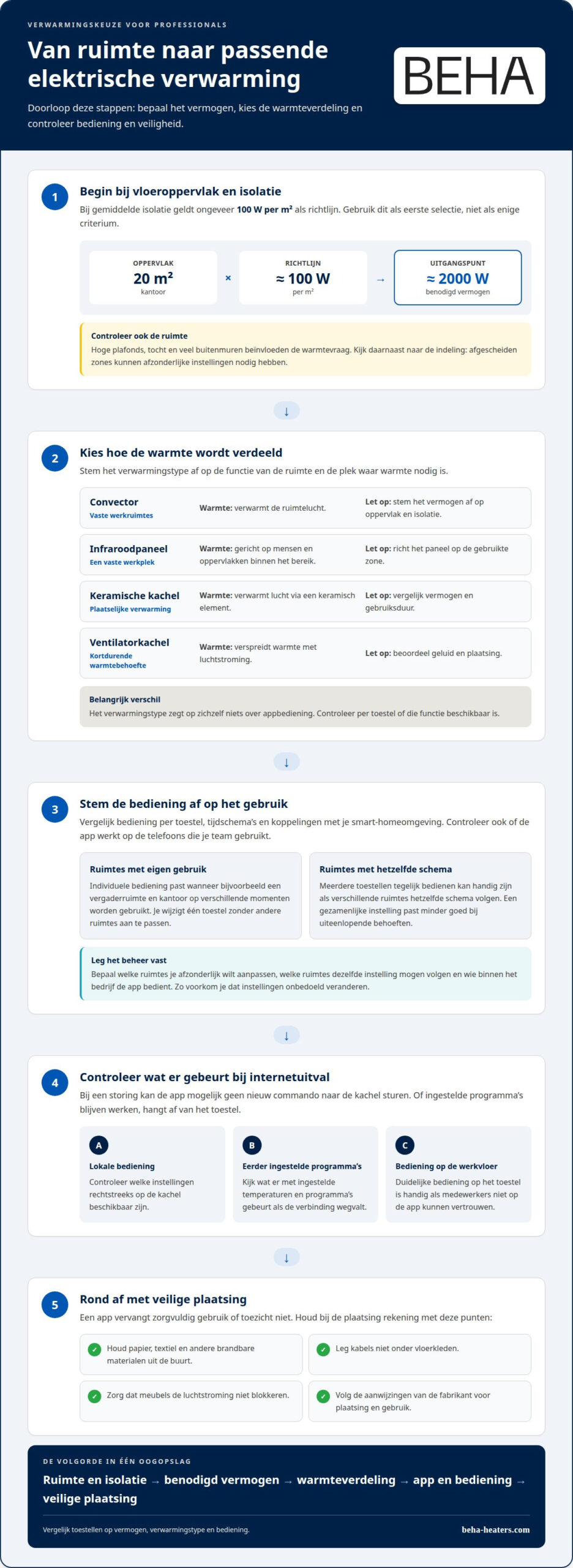
Start with the floor area and the insulation of the room. For average insulation, approximately 100 W per m² serves as a guideline. A 20 m² office therefore requires approximately 2000 W as a starting point. High ceilings, drafts, and many exterior walls influence the heat demand. Therefore, use the guideline as an initial selection, not as the sole criterion.
Compare the required power with that of the appliance. A small consultation room requires a different approach than an open workspace. Also consider the layout: separated zones may require separate settings. This way, you tailor the heating to the areas where employees actually work.
Convector, infrared, and ceramic heaters
Convectors heat the air in the room and are suitable as basic heating. Infrared primarily heats people and surfaces within the panel's range, which can be practical in a workspace that is not constantly occupied. Ceramic heaters heat air using a ceramic element and are often used for localized heating.
For a fixed office space, the desired heat distribution is particularly important. For a specific workstation, targeted heat may be more important. A fan heater distributes heat via airflow and may be suitable for short-term use. Check per device whether app control is available: the heating type itself does not indicate this.
Heaters for professional use
Which app-controlled electric heater is suitable for professional use? Choose a unit with a power output that suits the space and controls that align with daily use. A permanent workspace often requires different features than a temporary or localized heating need.
How do you compare convector, infrared, and ceramic heaters for professional use? Compare heat distribution, power output, and room usage. A convector heats the room air, infrared provides direct heat, and ceramic heating heats the air via the element. The function of the room determines which option is suitable.
| Option | Heat distribution | Fits especially well with | NB |
|---|---|---|---|
| Convector | Heats the room air | Fixed workspaces | Adjust power to surface area and insulation |
| Infrared panel | Targeted heat on people and surfaces | A fixed workplace | Point the panel at the used zone |
| Ceramic heater | Heats air via a ceramic element | Local heating | Compare power and operating time |
| Fan heater | Distributes heat with airflow | Short-term heat demand | Assess sound and placement |
First, select the heating type based on room usage. Then determine the required power and subsequently compare the app controls.
Security and operation during internet outage
App control makes remote adjustments easy, but you may not be able to use all functions in the event of an internet outage. Therefore, determine in advance which controls will remain important if the connection is lost.
In the event of a malfunction, the app cannot send a new command to the heater. Whether configured programs continue to work depends on the device. Therefore, check the controls on the device and what happens to previously set temperatures. In an office, clear local controls are useful if employees cannot rely on the app.
Make these practical considerations for a workspace:
- Check which settings are available directly on the heater.
- Note which room you want to adjust remotely and separately.
- Determine which rooms may follow the same setting simultaneously.
- Agree on who within the company operates the app.
Individual control is convenient when a meeting room and office are used at different times. You adjust one device without changing the settings in other rooms. This is useful, for example, if a meeting room is temporarily empty while employees are working elsewhere. Controlling multiple devices simultaneously, on the other hand, is convenient when different rooms follow the same schedule. A shared setup saves steps but is less suitable for rooms with varying needs.
An app provides a remote overview and makes it possible to change settings without walking to each device. For example, an administrator can adjust the heating in a separate workspace before it is used. This way, you align the controls per room with the work schedule. Also, agree on who is allowed to change settings so that they do not change unintentionally.
Safe use begins with a suitable location and sufficient free space around the heater. Keep paper, textiles, and other flammable materials away. Do not place cables under rugs and ensure that furniture does not block airflow. Follow the manufacturer's instructions for placement and use. An app does not replace careful use or supervision.
How much do app-controlled electric heaters for business use cost in the Netherlands? The price depends on factors such as power output, heating type, and controls. Therefore, compare devices based on these characteristics and the features your spaces require.
App functionalities and compatibility with smart homes
A heating app is particularly useful if the features align with the management of your spaces. Compare unit-by-device controls, schedules, and integrations with your smart home environment. Also, check if the app works on the phones your team uses. This way, you know if employees can operate the settings in practice.
Individual control provides control over a single heater. For example, you can adjust the heating in a meeting room without affecting other rooms. A user can operate a heater via the app and thereby override a set weekly timer. This is helpful if a meeting runs over or a room is used unexpectedly earlier. For an app-controlled electric heater for professionals, this flexibility is particularly useful with fluctuating occupancy.
A weekly schedule can align heating times with office hours. Compare whether you can set schedules per appliance or per group. With appliance control, you keep rooms separate; group control saves steps if multiple rooms follow the same schedule.
- Check which settings the app displays per device.
- Compare manual operation with the set weekly timer.
- See how the app groups devices or rooms.
- Check which smart home platforms support the device.
Wi-Fi control does not automatically mean that a device can connect to every smart home platform. Therefore, check compatibility. For example, compare Apple Home, Google Home, or Amazon Alexa with the platform you already use. Central control only works if the selected products actually work together.
Also make agreements regarding management within your organization. For an app-controlled electric heater for professionals, an administrator can set weekly schedules while employees make temporary changes. This keeps the schedule clear and allows you to respond to deviations in usage times.
Don't choose based solely on the number of features. Prioritize what your team needs: controlling devices individually, managing schedules, or connecting to a supported smart home platform.
Energy consumption and potential savings
Energy consumption depends on the power output and the duration of use. A device with a power output of 1000 to 2000 W draws more power when heating for longer periods. The app helps you adjust settings to actual usage times. This prevents an empty room from being heated unnecessarily according to the same schedule.
According to the cited text, app-controlled heating can yield savings of 20-30% on heating costs. That is a possible outcome, not a fixed guarantee. The savings depend, among other things, on the original heating pattern, the insulation, and how consistently you apply the schedules. A room that is often empty, for example, requires different settings than a continuously used workspace.
Gain insight into energy consumption with a simple approach. Note when heating is needed for each room and compare this with the set times. Then check if the weekly timer matches the occupancy. An early meeting or a changing schedule may be a reason to adjust the schedule. Use the app to limit unnecessary heating hours, without losing sight of comfort during working hours.
- Compare the capacity of the appliance with the heat demand.
- Adjust heating hours to the occupancy of each room.
- Adjust schedules when the work roster changes structurally.
- Assess consumption over the same period and compare similar usage conditions.
Setting a lower power output does not automatically lead to lower costs if the heating is on for longer. Therefore, assess both the settings and the operating time. Also consider the room: drafts or limited insulation can increase heat loss. Accurate control works best when the settings match the building and usage.
Do you want to tailor electric heating to the use of your spaces? View smart heating options and compare which control system suits your daily practice.
BEHA: Smart convectors steel front
BEHA offers smart convectors with steel fronts for professional spaces where you want to control the heating via Wi-Fi and an app. This allows you to tailor the settings to the use of an office or workspace. A smart convector is particularly suitable when app control and a fixed electric heating solution are important.
Do you also want to consider the appearance and finish? Then compare smart convectors with a glass front or a paintable front. If you do not need app control, Classic convectors are another option. First determine which room you heat and which control system suits it, and then compare the models.
View BEHA 's heating options and choose the convector that suits your professional space. Contact BEHA to discuss the possibilities.
Prepare your choice for daily use
A heating choice works best when it aligns with how your team uses the spaces. Also consider changes to the layout, the appearance of the room, and who will be responsible for operation. This way, you choose not only comfort on paper, but also a solution that fits daily practice.
For professionals looking for an app-controlled electric heater, BEHA offers smart convectors with a steel, glass, or paintable front. This allows you to weigh the finish alongside the heating requirements. Determine which features are decisive for your space and choose the version that suits them.
Discuss your choice with BEHA and discover which smart convector suits your professional environment. A well-considered choice provides a clear starting point for comfortable use.
Frequently Asked Questions
What is the heating capacity and range of professional electric heaters with app control?
The power output varies by model and partly determines how much heat the unit can deliver. At BEHA , smart convectors with a steel front range from 400 to 2000 W; models with a glass front have a range of 600 to 1250 W. The heating range also depends on insulation, ceiling height, and layout. Therefore, compare the model specifications with the characteristics of the room.
Which professional electric heaters work with Wi-Fi, Bluetooth, or a smart home platform?
The smart convectors from BEHA with steel, glass, and paintable fronts feature Wi-Fi and app control. Check in advance which smart home platforms the heater supports. Bluetooth is not listed as a control option for these product groups. If you use a smart home platform at the office, compare the supported connections with the system you already use beforehand.
What are the energy and consumption costs of electric heaters for professional use?
The consumption costs depend on the power output, the heating duration, and your electricity tariff. Calculate the power consumption by multiplying the power output in kilowatts by the number of usage hours; the result is the consumption in kilowatt-hours. Then calculate the energy costs using your tariff. For a fair comparison, use the same measurement period and record the usage hours per room.
Which safety features and certifications are required for electric heaters in the workplace?
For safe use, assess the manufacturer's instructions, the electrical connection, and the environment surrounding the device. Observe the installation instructions and prevent furniture or materials from covering the heater. For use in a damp room, the product designation is relevant: at BEHA , only the PGV/LGV models have an IP24 rating and a splash-proof design.
How do you install and manage app-controlled electric heaters in multiple rooms?
BEHAconvectors only require a standard power outlet: no boiler or pipes. Install each unit according to the product instructions and then connect it to Wi-Fi and the app. Give rooms recognizable names, such as 'office' or 'meeting room', so that the settings remain organized. Appoint an administrator and agree on who is allowed to modify schedules.
What are the risks regarding overload, fire safety, and data security with app-controlled heaters?
Overloading can occur if multiple electrical devices draw too much power from the same outlet. Therefore, avoid connecting power strips to each other and follow the electrical connection instructions. Keep flammable materials away and do not cover the heater. Secure the app management account with a strong, unique password and share login credentials only with designated employees.