
Choosing a smart home compatible electric convector: what to look for?
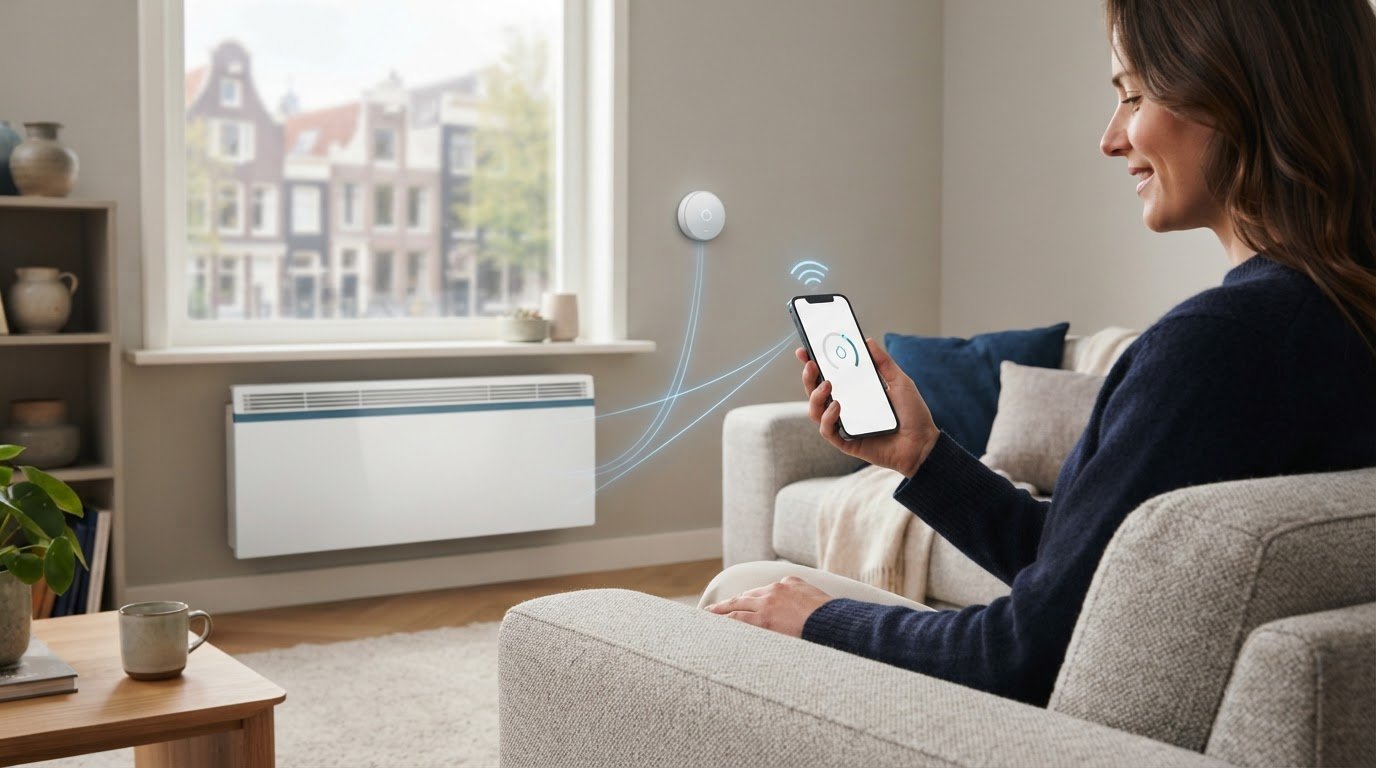
Does a convector work with your smart home platform just because 'Wi-Fi' is on the packaging? Not automatically. A smart home compatible electric convector must not only be controllable via an app, but also demonstrably work with the devices and platforms you use. That difference determines whether smart heating at home works smoothly.
Remote control, a thermostat, and programs can enhance daily comfort. However, Wi-Fi and app control do not automatically mean that you can connect the convector to a smart home platform. Therefore, check which controls are supported and how the convector fits into your space. BEHAconvectors can be controlled via Wi-Fi and an app. Furthermore, the version with a steel, glass, or paintable front helps you make a suitable choice for your interior.
In this article, you will learn how to distinguish between different forms of smart control and assess compatibility based on product specifications. You will also discover what to look for regarding comfort, usability, and appearance. This way, you choose not just a smart label, but a heating solution that suits your home and daily habits.
Key Points
- A smart convector offers digital control, but that does not automatically mean it works with a smart home platform.
- Map out which app, platforms, and automations you want to use before you choose.
- When comparing a smart home compatible electric convector, only compare features that the product specifications actually confirm.
- Match the front finish to your interior: choose from steel, glass, or a paintable front.
- BEHA combines more than a hundred years of experience with smart convectors that can be controlled via Wi-Fi and an app.
What does smart home compatibility mean for an electric convector?
An electric convector heats a room by warming up air and setting it in motion. The warm air rises, while cooler air flows towards the convector. This creates air circulation that helps heat the room. The designation 'smart' tells you something about the operation, but does not automatically indicate which other devices the heater can work with.
A smart home compatible electric convector is a convector whose digital functions demonstrably work together with the smart home platform or the devices you wish to use. This collaboration can go beyond control via a dedicated app. Consider an automation system where the heating responds to a setting in another system. Which connections are available depends on the model and the supported functions. A general overview of the components and capabilities of smart home technology helps to understand the broader role of devices and connections.
What makes a convector suitable for a smart home?
Wi-Fi can connect the convector to an app, allowing you to view or adjust settings digitally. That is app control. In itself, it does not prove that the convector can also connect directly to an external smart home platform or receive commands from other devices. Therefore, view Wi-Fi as a connection, not as a seal of approval for integration.
Distinguish between three operating levels:
- On the unit: you set the heating using the controls on the convector.
- Via an app: you use the digital controls that come with the device.
- Via a platform: you connect the convector to other devices or automations, if that option is configured for the model.
Therefore, check not only whether a device has Wi-Fi, but also which app, connections, and features are listed in the product specifications. Compatibility can vary by model. Two convectors that both work via an app do not necessarily work with the same external devices.
Which smart features do you notice in daily use?
With remote control, you can adjust settings without walking to the convector. This is useful, for example, if you want to adjust the temperature from another room. App control makes this easy, but does not in itself guarantee lower energy consumption. That also depends on your heating habits and the room.
Some models offer schedules, allowing the heating to operate at selected times. Temperature control can help maintain a desired setting. The features vary by device, so do not assume that functions are only listed for a different model. You can read more about wireless control in the guide on electric convectors with Wi-Fi . This allows you to distinguish app control from the platform connection you might be looking for.
How do Wi-Fi, app control, and smart home connections work together?
The convector connects wirelessly to your network, after which an app can display or transmit commands. Sometimes operation takes place via an internet service; with other systems, part of the process goes directly through the home network. The route varies by product and app. An external smart home platform can also play a role, but only if the convector and the platform support that connection.
That distinction is practically important. With direct app control, for example, you change the temperature or another setting yourself in the corresponding app. Additionally, a platform connection can enable automation: a setting or event in the platform then triggers a command to the heating system. Voice control via Alexa or Google Home therefore does not automatically follow from Wi-Fi or app control. Support must be explicitly indicated for the specific model and the desired function.
What is the difference between Wi-Fi and platform integration?
Wi-Fi is the wireless connection between a device and a network. It does not tell you which services, apps, or other devices can communicate with it. Additional support is required for platform integration so that data and commands are exchanged in an agreed-upon manner. Therefore, a convector can operate via Wi-Fi in its own app without being controllable with Alexa, Google Home, or another platform.
Also pay attention to the wording in a product description. 'App control' means something different from 'compatible with' a specific platform. Even when a connection is mentioned, it does not necessarily include all functions. Adjusting the temperature, setting a schedule, and integrating the convector into an automation system can be separate capabilities. Always check compatibility by model, platform, and desired function.
Which compatibility data should you compare?
First, note down what you want to do. Do you only want to adjust the temperature via an app, heat at fixed times, control the convector with a voice command, or have it work in conjunction with another device? Next, compare these wishes with the product specifications. A general reference to smart control does not automatically confirm all these possibilities.
- App: is it stated which app you are using and what controls are available in it?
- Platform: Is your smart home platform explicitly mentioned for this model?
- Functions: are temperature control, schedules, voice control, and automation each described separately?
- Connection: Is it indicated what happens to operation via the device or the app if Wi-Fi or the internet fails? That varies by product.
A smart thermostat can play a central role in heating control. ENERGY STAR's explanation of smart thermostats provides background on this type of control, but does not prove that a specific convector works with it. Therefore, evaluate the combination of the device and desired functions, not just the network or the app. BEHA smart convectors can be controlled via Wi-Fi and an app. View 's smart electric convectors BEHA if you wish to compare this form of control with a matching front panel design.
Which smart home compatible electric convector suits your situation?
The best choice depends on what you need on a daily basis. Do you primarily want to adjust the temperature via an app, or do you expect the heater to work with other devices? Differentiate between necessary functions and added convenience. This prevents an attractive standalone feature from outweighing the controls you actually use.
Use this table as a frame of comparison. Fill in only what the product specifications for the relevant model confirm. An empty or unexplained field does not prove that a feature is supported.
| Selection criterion | What are you comparing? | Fits especially well with |
|---|---|---|
| App control | Is control via an app mentioned, and which settings can you adjust in it? | You want to control the convector digitally via a single manufacturer app. |
| Platform connection | Is your desired smart home platform explicitly listed in the support? | You want to connect the convector to other devices or an existing system. |
| Automation | Are schemas or other automated commands described for this model? | You want operation at fixed times or as part of an automation system. |
| Front version | Is the front made of steel, glass, or paintable? | You want the convector to match the room and your interior. |
Choose between app control and connection with your smart home
Match the execution to the space and interior
The front finish is a separate choice alongside the digital functions. A steel front has a sleek, functional appearance; glass gives the heater a different accent. A paintable front offers the possibility to match the look to your interior. Compare these finishes based on what you find comfortable in the room, not as an indication of other smart functions.
The required power also depends on the situation. Check the model specifications and take into account the room where you want to use the convector. Do not base your choice solely on a general indication for a specific room size. The buying guide for an electric heater with a steel front can help compare that model.
Finally, create two short lists: what capabilities must the convector have, and what would be extra handy? For example, list app control under requirements and platform automation under extras if you don't really need them. Reverse those priorities if integration with your smart home is central. Then, compare models based on the same points. This way, you choose based on demonstrable functions and a version that fits your space.
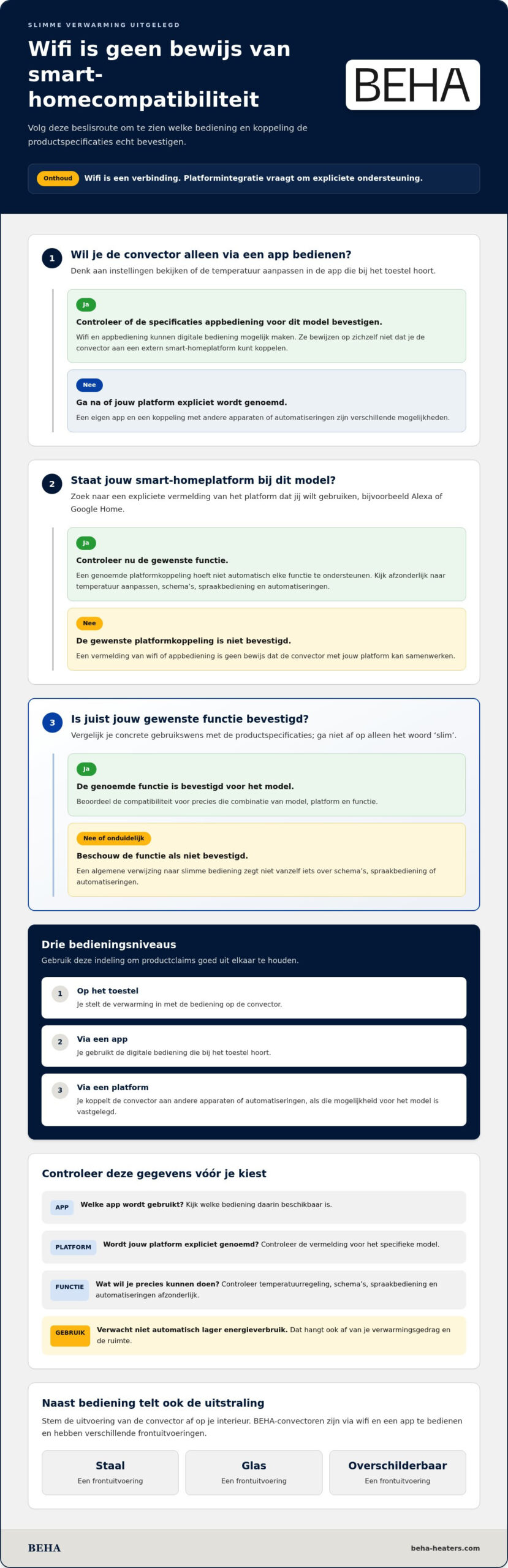
This is how you evaluate a smart home compatible electric convector before purchasing
A good purchase doesn't start with the longest feature list, but with what you want to control at home. Write down which app you like, which smart home platform you already use, and which actions you want to automate. Compare those wishes with the specifications of the exact model. This prevents a generic designation like 'smart' from promising more than the described features.
Go through four checks before choosing a model
Keep these steps in mind when comparing models. Keep your wish list handy and evaluate each feature individually. This way, you can see whether a convector suits simple use, a more extensive smart home, or your preference for a specific model.
- Determine the desired control method. Is a manufacturer app for adjusting settings sufficient? Note this as a requirement. If you want the convector to respond to another device or platform, describe exactly which connection you need.
- Check the model details. Look in the product specifications for the name of the app, supported platforms, and individual features. A mention of Wi-Fi or app control does not automatically confirm voice control or pairing with an external system.
- Compare the daily functions. Check if temperature control, schedules, and automation are explicitly mentioned. An adjustable schedule can be useful, but it is not the same as integrating with a smart home platform. Compare the same points for each model.
- Assess the finish and the room. Choose a front that matches your interior and compare the model specifications with the room you want to heat. Also check what the documentation says about operation when Wi-Fi or the internet drops out. This behavior can vary by model.
Avoid common misunderstandings when comparing
Wi-Fi describes a connection, not universal access to every platform. Therefore, do not assume that every wireless device will work with your existing smart home. Also, note the difference between a function you configure yourself and a connection where an external system issues commands. The model information clarifies which features are described.
A handy buying rule: check the functionality, not just the word 'smart'. For every claim, ask yourself whether it involves app control, a schedule, platform integration, or specific automation. Note down what you find and compare it to your wish list. If a feature is essential to your choice, support for exactly that feature must be explicitly listed with the model. This way, you evaluate a smart home compatible electric convector based on usable features, not on a broad label.
BEHA offers smart convectors that can be controlled via Wi-Fi and an app, with steel, glass, and paintable fronts. Compare the versions and determine which control method suits your habits. See which smart convector solution matches your preferences.
BEHA smart convectors: connected comfort with a well-thought-out design
A smart convector needs to match more than just your method of operation. The appearance and the room you are heating also matter. BEHA is a manufacturer of electric heating appliances with over a hundred years of experience. The smart convectors can be controlled via Wi-Fi and an app. This allows you to weigh digital control against the front panel design that suits your interior.
The range includes versions with a steel, glass, or paintable front. In addition, BEHAproducts meet ECODESIGN requirements. This is relevant product information, but in itself not proof of integration with an external smart home platform or of specific energy savings. Keep these features separate when comparing.
Which BEHAstyle matches your interior?
A steel front is one of the available versions and has a calm, functional appearance. A glass front offers a different visual accent, while you can match a paintable front to your interior. The right choice depends on the location, the style of the room, and the look you prefer.
If you want to compare steel fronts further, the complete guide to electric heaters with steel fronts will help you with that material choice. Evaluate the front independently of the smart features: the finish determines the appearance, while the product specifications describe the operation.
Make your choice based on features and confirmed compatibility
Start with your usage. Is control via Wi-Fi and an app sufficient, or do you want a specific connection to a smart home platform? These requirements are not the same. The BEHAconvectors can be controlled via Wi-Fi and an app. Do not automatically infer from this that a platform or external function is supported. Always check the desired integration in the specifications of the exact model.
A smart home compatible electric convector suits your situation when the described controls match what you want to do and the design matches your interior. Compare app control, potential platform support, and front panel options. This way, you base your decision on the features that matter to you, without confusing different product claims.
Would you like to view the versions and smart convectors from BEHA ? Discover the smart convectors from BEHA and compare which front finish suits your space.
Choose your heating with confidence
Make your wishes the starting point. Note which controls you want to use daily and which connectivity is truly necessary. Compare those requirements with the model's specifications so that you choose based on suitable features rather than a generic smart label. This clarifies whether a smart home compatible electric convector aligns with your lifestyle and the look you envision for the room.
You don't have to use every possible automation. A solution that works pleasantly and simply for your household can be more valuable than features you don't need. Therefore, carefully weigh operation, integration, and design against each other. If you furnish your home more broadly with an eye for both smart living comfort and high-quality sound, you will find suitable speakers at OrangeAudio that seamlessly fit into a modern interior. With these clear starting points, the next step becomes easier.
View the models and discover which option suits your needs: discover the smart electric convectors from BEHA. This way, you can confidently take the step towards heating comfort that suits your home.
Frequently asked questions about smart convectors
Is an electric convector with Wi-Fi automatically suitable for every smart home?
No, Wi-Fi does not automatically mean that a convector works with every smart home platform. The connection may be intended for control via its own app, without integration with other systems. Therefore, check the product specifications of the exact model and look for your platform and the function you want to use. A mention of voice control or control via an app is not the same as support for scenes or automations.
Can I control a smart home compatible convector without internet?
That depends on the convector and how you want to operate it. Controls on the unit may remain available, while functions via an app or internet service may not be accessible. Also, control via the local network may work differently than remote control. Consult the manual for what happens in the event of an internet or Wi-Fi outage. Do not assume that every function remains available offline.
Does an electric convector work with Google Home or Amazon Alexa?
This is only possible if the product specifications for the specific model mention support for Google Home or Amazon Alexa. An app used to set the temperature does not prove this support. Also check which commands are possible: a convector, for example, can respond to a temperature setting, but not to every voice command or automation. This way, you know in advance whether the function you want to use is actually available.
How do I know if a smart convector works with my existing devices?
Start with the exact names of your smart home platform and devices. Compare these with the compatibility information and manual of the convector. Pay attention not only to a general platform mention, but also to the functions that work with it. For example, if you want a sensor to activate a heating setting, check whether both the convector and that specific automation are supported. A shared app name alone does not prove compatibility.
What happens to my settings if the Wi-Fi goes down?
That varies by model and setting. On-device controls may be independent of Wi-Fi, while app control or remote functions may depend on the connection. Additionally, a schedule may be stored locally or operate via a service. Check the manual to see what happens to temperature settings and programs in the event of a connection loss. Without that information, you cannot assume that all settings will continue to work.
Does a smart home compatible electric convector always save energy?
No, smart control does not guarantee lower energy consumption. A schedule can help to heat when you use the room, but the effect depends on your settings, duration of use, and room conditions. Running a convector for a long time or at a high temperature can actually increase consumption. Use programming functions consciously and assess your actual usage instead of relying solely on the smart label.
Can I control multiple electric convectors from one app?
This is possible if the app you are using supports multiple compatible convectors and you can add them to the same account. Check the product information to see if you can configure devices individually and, if desired, group them by room. Controlling multiple devices via a single app does not automatically mean that models from different brands or product ranges are combined. Therefore, check the app support for each model you wish to combine.