
Control heating appliances centrally via an app at home
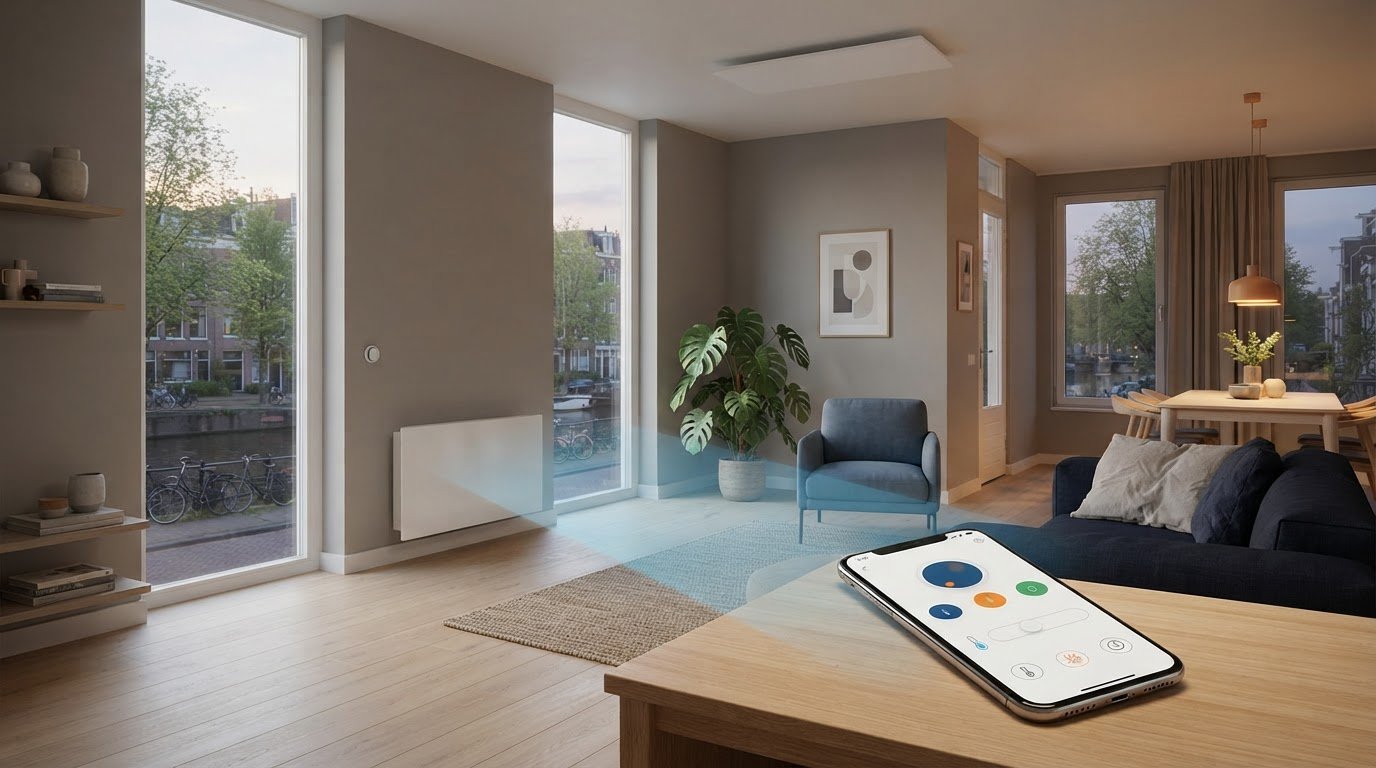
A central app turns individual heating devices into a single, targeted control system. Heating devices with central app control allow you to adjust settings and schedule heating times via your phone; this way, you heat rooms when you use them. An example of such a setting is an infrared panel that automatically switches off at 11:00 PM.
This is useful when you do not want to heat every room at the same time or to the same temperature. An app keeps the controls clear and organized. Thermostats and sensors can help tailor the heat per room. Consider in advance which rooms you want to heat and how you use them daily.
In this article, you will read how central app control works, the role that apps, sensors, and thermostats play, and how smart heating devices differ. You will also discover what to look for when choosing, so that the control aligns with your home and daily routine.
Key points
- Map out when you need heat for each room and set your heating times accordingly.
- Automatic schedules can switch devices on and off at fixed times or upon certain events.
- Position sensors and thermostats carefully: do not place them close to windows, doors, or heat sources.
- Heat only the rooms you use; depending on your usage pattern, targeted control can help save on heating costs.
- Compare smart convectors, classic convectors, and other heating types based on operation, heat demand, and the room in which you want to use them.
Centrally control electric heaters with the Energy Control App
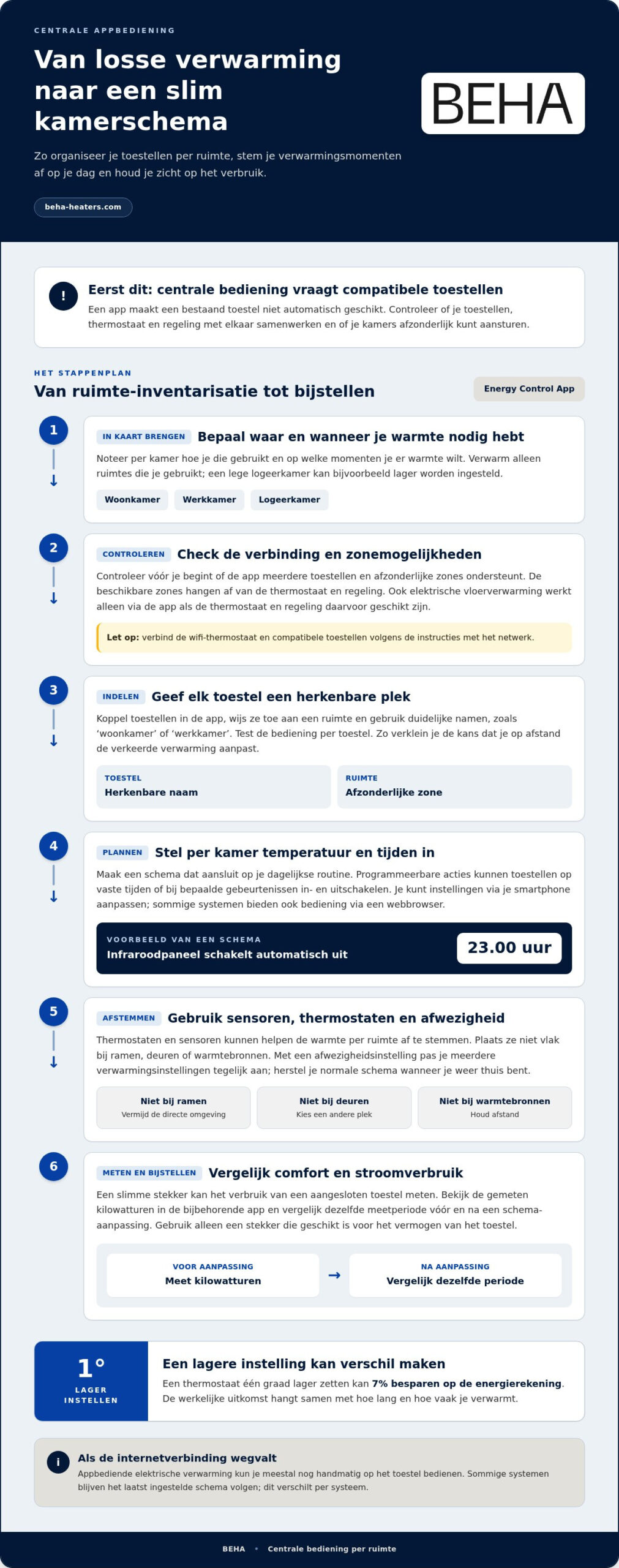
The Energy Control App can control electric heaters from a single overview, provided the devices and controls are compatible. You can organize settings by room and tailor heating times to your daily usage.
Control heaters via one app
With heating appliances featuring central app control, you manage multiple appliances from the same app. Most heating apps can manage different heaters, but the available zones depend on the thermostat and control system. Which smart thermostats support multiple heating appliances and zones? Choose a system that can display appliances individually and control zones separately.
First, give each device a recognizable name, such as 'living room' or 'office'. Then, set the desired temperature and heating times for each room. Check beforehand whether the app supports multiple devices and separate zones. This prevents a single adjustment from affecting all rooms at once.
Electric underfloor heating can also be controlled via an app, but only if the thermostat and control system are compatible. An app does not automatically make an existing device compatible. Therefore, check the connection between the device, thermostat, and app before creating a central layout.
remote control
You can control a connected thermostat remotely using a smartphone. Open the app to adjust the temperature or change a schedule. Some systems also offer control via a web browser. To do this, log in to the corresponding environment and select the correct room or thermostat.
A schedule can, for example, switch off a heater at 11:00 PM. With heaters controlled by a central app, you can adjust settings without walking to the thermostat. Give rooms recognizable names; this reduces the chance of operating the wrong heater remotely.
Depending on the system, programmable actions can also control lighting or other electrical devices. For example, garden lighting that switches off half an hour before sunrise. This only works with devices connected to the control system and supported by the app.
Connecting and securing devices
Do you want to connect various heating devices to one central app? Connect the Wi-Fi thermostat and compatible devices to the network according to the instructions. Then pair them in the app, assign each device to a room, and test the operation individually.
How secure are heating apps and how do you protect connected devices from hackers? Use a strong, unique password for your account and secure your home network. Do not share login credentials unnecessarily and install updates for the app and router. Also check which phones have access when multiple household members control the heating.
In the event of an internet outage, you can usually still operate app-controlled electric heating manually on the unit. Some systems continue to follow the last set schedule. Therefore, how you control the heating until the connection is restored varies by system.
Save energy by not heating rooms unnecessarily
Start with one practical choice: heat only rooms you use. For example, adjust the temperature in the living room based on your presence and turn down the heating in an empty guest room.
A smart electric heater and a heat pump are different investments and do not automatically qualify for the same subsidy conditions. For heat pump schemes, factors such as the type of installation and the conditions of the scheme play a role. Therefore, do not assume that separate smart heating systems qualify for the same subsidy.
What do heating appliances with app control and any installation cost in the Netherlands? The total expenditure depends on the appliance, the required thermostat, and any necessary work. Your operating costs then depend mainly on power consumption, heating duration, and your energy tariff.
Temperature schedules and consumption
Create a schedule for each room that suits your day. For example, heat the home office around the times you work there, instead of keeping the entire house at the same temperature. Turning the thermostat down by one degree can save 7% on the energy bill. The actual result depends on how long and how often you heat.
The app helps you adjust settings when your routine changes. Start with a lower setting in rooms that are rarely used and then compare comfort and consumption. This way, you discover which rooms need heat and when you can scale back the schedule.
Keyboard shortcuts for absence
Use an away setting when you leave the house. This allows you to adjust multiple heating settings at once, without opening each room separately. Restore your normal schedule when you return home. Also check if lighting or other connected devices are included in the same action.
An automatic setting prevents the heating from continuing to run according to a schedule that no longer fits your day. Adjust the away mode when you work from home or use a room unexpectedly. This way, you stay in control of the temperature and energy consumption.
Measuring consumption with a smart plug
A smart plug can measure the power consumption of a connected electrical appliance. Place it between the appliance and the socket and view the measured kilowatt-hours in the accompanying app. Only use a plug that is suitable for the appliance's power rating.
Compare the same measurement period before and after adjusting your schedule. This allows you to see, for example, whether shorter heating times reduce the consumption of supplementary heating. A smart plug only measures the device it is connected to, not automatically the total power consumption of your home.
View usage costs
Multiply the measured kilowatt-hours by your own electricity rate to calculate the operating costs. Use the same measurement period and the same device when comparing settings. This way, you can see if a lower temperature or a shorter schedule makes a difference.
Savings on heating costs can amount to 20-30%, depending on your usage pattern and the use of app features. Do not use that range as a fixed expectation: the result depends on which rooms you heat and how you apply the settings.
What can you expect from this Smart Home system?
A Smart Home system can automate heating based on temperature, schedules, and events. Which features are available depends on the app, thermostat, and connected devices.
Central app control bundles settings and enables operation via your smartphone. You can also control a thermostat locally. Apps can display schedules and energy data; geofencing only works if the control system supports that function. Remote control via an app depends on the connection and the capabilities of the system. Whether you need a hub depends on the system.
Automate based on temperature and events
A temperature sensor allows a control system to react when a room becomes warmer or colder than the set value. Additionally, you can use schedules, for example, to have an infrared panel automatically switch off at 11:00 PM. Event-driven functions can, for example, switch on lighting around sunset. Geofencing uses the location of a smartphone but requires support from the app and permission for location use.
Consider which events you want to automate when making your choice. A schedule suits fixed routines; a temperature threshold responds to the measured temperature in the room. This way, you control the heating not only based on time but also on the conditions at home.
Regulation per room and zone
A zone is a separate control area, such as a living room or bedroom. With separate sensors and corresponding thermostats, each zone can follow its own temperature setting. This way, the temperature at one central location does not automatically determine the setting for all rooms.
A Wi-Fi module and temperature sensor can be components of a heating control system. The sensor measures the temperature at the location where it is placed; the module connects a device or control system to Wi-Fi. Do not place the sensor close to a window, door, or heat source, as this may affect the measurement.
There is no universally required power for a temperature increase of 15°C. The required heat depends on, among other things, the room volume, insulation, outside temperature, and heat loss. A well-insulated room generally requires less heating power than a drafty room of comparable size. Therefore, match the power to the room and the desired heating time.
App operation and connection requirements
With central control, you can change settings via your smartphone. A separate thermostat offers direct control without an app. In the event of an internet outage, remote control may be lost, while some systems continue to follow the last set schedule.
Check which Wi-Fi band the app uses. The Smart Life app supports Wi-Fi on 2.4 GHz and not on 5 GHz. A hub is required for systems that communicate on this band, but not for every Wi-Fi system. Also check whether the app displays temperature history or consumption information, as such features vary by control system.
Smart heating with sensors and thermostats
A thermostat measures the temperature and controls the heating based on the desired setting. Sensors and smart features help tailor the comfort per room.
Manage thermostats and locations
An app can manage multiple devices. For multiple homes or locations, a clear organization helps: give each thermostat a recognizable name, such as 'living room' or 'upstairs'. This way, you won't accidentally adjust the temperature of the wrong room.
Check whether the system can control individual rooms as zones. A thermostat measures the temperature at the location where it is mounted. Therefore, do not place it close to windows, doors, or heat sources. For example, a sensor next to a radiator may measure a different temperature than the rest of the room.
A thermostatic radiator valve regulates the heat at the radiator. As soon as the room is warm enough, the valve can limit the heat supply to the radiator. This is useful when rooms have different heating needs. Adjust the valve for each room and compare the result with the desired temperature.
IFTTT can be used with linked thermostats when both the heating control and IFTTT support the desired connection. This allows you to have available services react to an event, such as a change in a linked setting. Check which features work together before setting up an automation.
Collaboration with smart home platforms
A heating system only works with Google Home, Alexa, Apple HomeKit, or Matter if it explicitly supports that connection. Look for the platform in the product information and check if the connection applies to your thermostat and app.
A smart home platform can bundle control, but it does not replace the thermostat. The thermostat continues to measure the temperature and regulate the heating. The platform only adds features supported by the integration. Therefore, check if you can adjust temperature settings, select zones, and use schedules.
A lower setting can also help. Lowering it by one degree can save 7% on the energy bill. Adjust the temperature to the room and the time you use it. This way, you combine thermostat control with comfort, without setting all rooms to the same level.
After pairing, test one function at a time. For example, set the temperature of one room via the platform and then check the thermostat. This way, you will quickly notice whether the connection and zone configuration are working as expected.
Placement is also important for a temperature sensor for a radiator. Preferably, do not place the sensor close to a window or door, so that drafts or heat loss do not directly affect the measurement.
With a Smart Home System, multiple apartments can be controlled independently of each other using a single boiler. Therefore, the settings do not need to be the same for every apartment.
Types of smart stoves and heaters
A smart heating system is not one specific type of device. Think of a convector, infrared panel, fan heater, or gas fireplace controlled via a smartphone or tablet. First, determine where you need heat, how quickly the room needs to warm up, and which devices you want to control via the internet.
Convectors for even room heating
A convector heats air that flows through the unit and then moves into the room. Wi-Fi models combine heating with control via an app, allowing you to adjust the settings in a home office separately, for example. An Eco Slim Wi-Fi Convector has a power output of 1000 to 2000 W. This range helps when comparing units for different heating needs.
For a room with average insulation, approximately 100 W of heating power per m² serves as a guideline. According to this rule of thumb, a 15 m² room therefore requires about 1500 W. Insulation, ceiling height, windows, and desired warm-up time influence how much power is appropriate. Therefore, use the guideline as a first estimate, not as a substitute for assessing the room.
Infrared panels for targeted heat
An infrared panel emits heat to people and surfaces in the room. This enables targeted heating, for example at a fixed seating area or work table. An infrared panel with LED lighting and Wi-Fi has a power output of 700 W. The portable infrared panel with Wi-Fi has a power output of 350 to 720 W. These figures describe different devices, so do not compare them as a single model range.
With infrared, placement is important: aim the panel at the spot where you want to feel the warmth. A panel for an entire room requires a different consideration than a device for local supplementary heating. The app makes settings accessible remotely, but the power output and placement also determine how much heat the device delivers.
Fan heaters and appliances with flame effect
An electric fan heater blows heated air into the room. This can be practical for a room you use temporarily, such as a hobby room. When using an app, check the compatibility between the device and the control system. A smartphone connection does not automatically make a device remotely controllable: the device or the connected control system must support this function.
Many manufacturers of gas fireplaces offer control via a mobile phone or tablet. This allows you to operate a gas heater or gas fireplace, but such a device works differently than electric heating. Therefore, compare not only the app, but also the heat source and the room in which you want to use the device.
The key: choose the appliance type based on the room and the desired heat. Then compare the power output, placement, and online control. This way, you determine whether convection, targeted infrared heat, or temporary air heating suits the room.
BEHA: Smart convectors steel front
BEHA is a logical next step if you are looking for electric heating that you can control via Wi-Fi and an app. The smart convectors with a steel front suit those seeking a sleek, robust finish; there are also versions with a glass or paintable front.
Choose a front that matches your interior and determine which rooms you want to heat specifically. With the BEHA Smart App, you can adjust the settings to the usage of those rooms. If you are looking for a convector without smart control, Classic convectors are also available.
Compare the models and discover which smart convector suits your home. Visit the BEHA to view the range.
Choose a heating system that suits your home
Determine which rooms you want to heat and what style suits them. For heating appliances with central app control, you weigh operation and design against each other. Consider how you use the rooms, where the appliance will be placed, and which front panel matches your interior.
BEHA offers smart convectors with a steel, glass, or paintable front. This ensures the finish matches the room and allows you to control the heating centrally via the app. Compare the versions with your living preferences and choose the solution that suits your daily use.
Would you like to see which version suits your situation? Contact BEHA and explore a suitable next step. With a choice that aligns with your home, you create space for targeted comfort and controls that fit your routine.
Frequently asked questions about app-controlled heating
Which thermostats can be controlled with an app?
Wi-Fi thermostats and smart thermostats with a corresponding app can be controlled remotely. Check if a thermostat is suitable for your heating type and the features you need. The BEHA Smart App works on iOS and Android and controls compatible smart convectors with a steel, glass, or paintable front. Therefore, choose based on your appliance and desired control method, not just the appearance of the thermostat.
Which types of heating appliances can be controlled centrally via an app?
Electric heaters can be controlled centrally via an app if the device or control system is compatible. This applies, for example, to smart convectors. Some infrared panels, fan heaters, and gas fireplaces also feature app control, but compatibility varies, and gas fireplaces use a different heat source. Therefore, compare not only the app but also the type of device and the control system.
How much energy and money can you save with smart app-controlled heating?
Targeted heating can reduce heating costs by 20-30%, depending on your usage pattern and the use of app features. This is not a fixed amount: the costs in euros depend on electricity consumption and your energy tariff. To assess the effect on your home, compare consumption over similar periods and note which rooms and settings you have adjusted. This way, you link a change to your own usage.