
How can you set up a convector heater with Wi-Fi? A complete guide
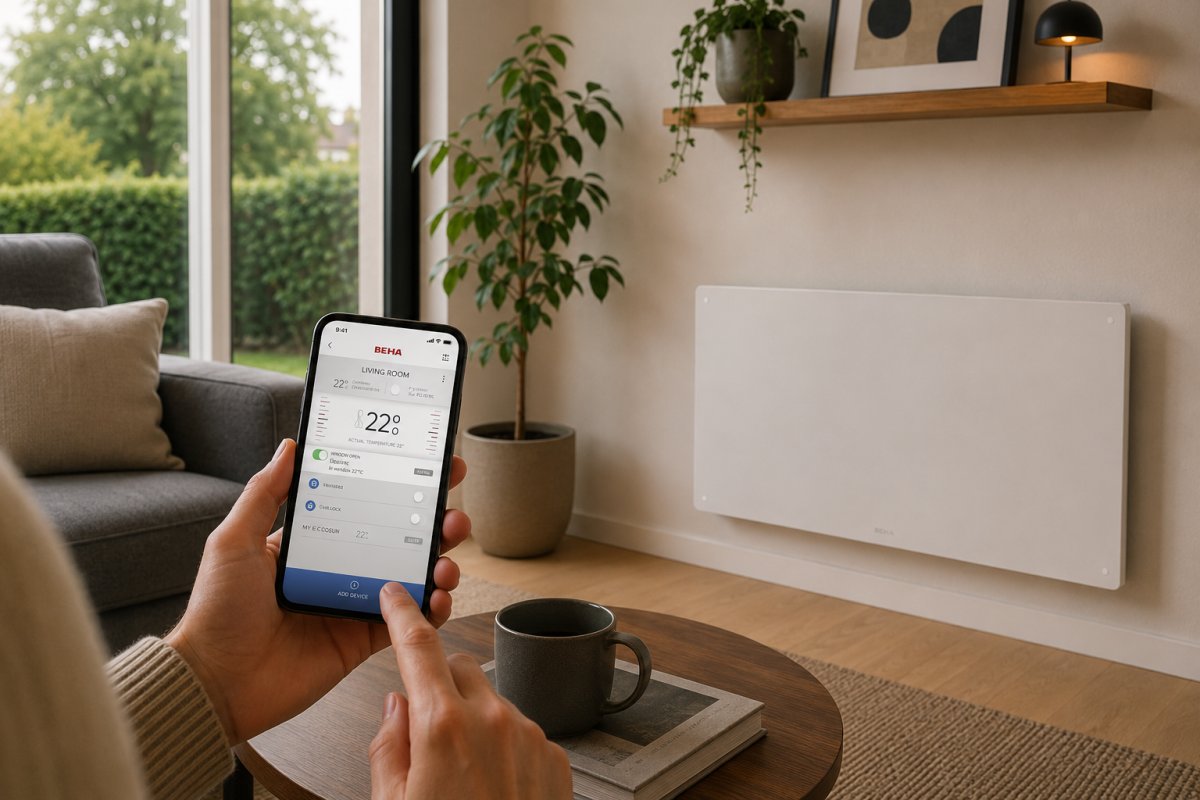
A successful Wi-Fi installation almost always starts with your router settings, not with the heater itself. It is a familiar and frustrating moment: you have brought a high-quality, Norwegian heating solution into your home, but the smartphone app refuses to connect. Setting up a convector heater with Wi-Fi should be a piece of cake, but unclear manuals and confusion regarding 2.4 GHz versus 5 GHz networks often cause unnecessary headaches.
If you are looking for online support to process complex texts and instructions faster, you can learn more about Teggl for an improved reading experience.
Fortunately, it doesn't have to be complicated if you know exactly what to look out for. We understand that you want to benefit as soon as possible from a smart heated home that you can operate effortlessly, wherever you are. In this guide, you will learn step-by-step how to connect your convector heater to Wi-Fi and configure it optimally for maximum comfort and a lower energy bill. We will walk you through the technical preparations, the pairing process via the BEHA SmartHeater app, and setting up smart weekly schedules so you can start saving on your fixed costs immediately.
Key Points
- Discover why a 2.4 GHz Wi-Fi network is essential for a stable connection with your smart heater.
- Learn how to set up a Wi-Fi convector heater using a clear step-by-step guide in the app.
- Solve common pairing problems by making smart use of Bluetooth and the correct network settings.
- Maximize your living comfort and lower your energy bill by setting up personalized weekly schedules and zones.
- Experience the convenience of the Dutch-language BEHA SmartHeater app for intuitive remote control of your heating.
Preparation: what do you need to connect your convector heater to Wi-Fi?
Before you start setting up your Wi-Fi convector heater, it is essential to lay the right digital foundation. Many users get stuck because they reach for the heater immediately, whereas the key to a flawless installation lies in preparing your home network. A smart heater is more than just a heating element; it is part of your smart home ecosystem. To understand how this technology works, you can read more about what a smart thermostat is and how wireless connectivity contributes to more efficient energy consumption.
Make sure you have the following items at hand before activating pairing mode:
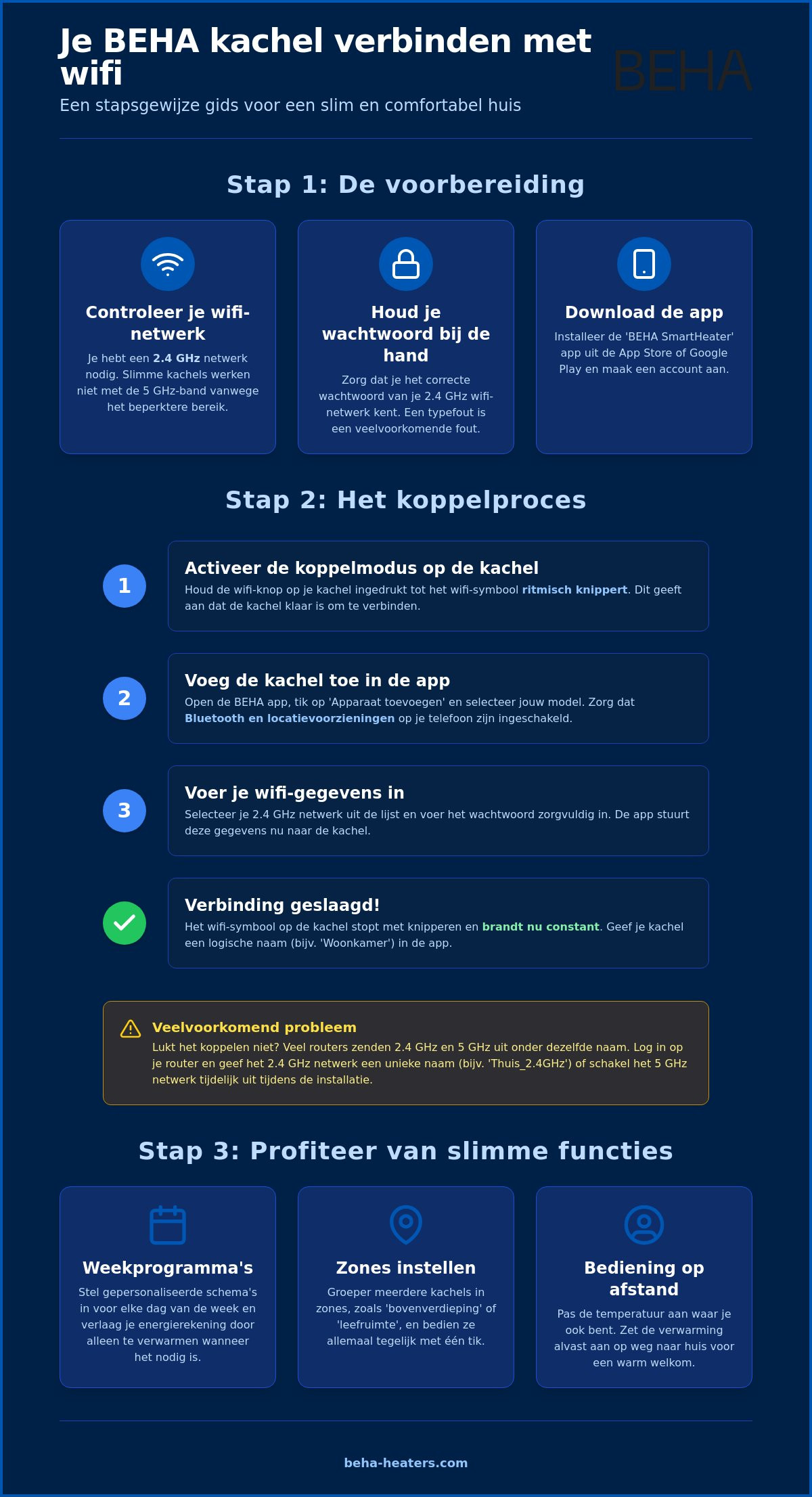
- The password for your 2.4 GHz Wi-Fi network: Almost all smart convectors communicate exclusively via the 2.4 GHz band. This is because this frequency has a greater range and penetrates walls better than the faster 5 GHz variant.
- Accessing your router settings: Sometimes it is necessary to temporarily split your network if your router broadcasts both frequencies under the same name.
- A charged smartphone or tablet: Use this to perform the full configuration.
Download the correct app and create an account
The first step is to install the official BEHA SmartHeater app, which is available in the App Store and Google Play. Create an account immediately using a valid email address. This is crucial for the security of your system and ensures that you receive important software updates. Make sure that you have both Bluetooth and location services enabled on your phone during the process. These features are necessary for the app to detect the heater in pairing mode. Without these permissions, the app simply will not find your device.
Check your Wi-Fi signal strength
A stable connection is not only convenient for operation, but also essential for the safety and automatic updates of your system. Test the signal strength at the exact location where the heater will be installed. Use your smartphone to check if you have at least two stable signal bars there. Reinforced concrete walls or thick insulation layers can significantly attenuate the signal. Is the connection shaky at that location? Then consider installing a Wi-Fi booster or a mesh point before permanently setting up your convector heater with Wi-Fi. This prevents the heater from going offline when you need it most.
If you are looking for high-quality components for your technical installations, you can more about Asthome Smart Electrical Supplies for a wide range of reliable solutions.
Step-by-step guide: how to set up your Wi-Fi convector heater
You have completed the preparations from the previous step and your network is ready. Now it is time for the actual execution. Setting up your Wi-Fi convector heater is a process that requires precision, but with the right method, it is done within minutes. It is the bridge between a traditional, passive heater and an intelligent heating system that responds to your lifestyle.
Putting the heater in coupling mode
Each heater has a specific way to activate pairing mode. On most modern models, such as those from BEHA, you press and hold a specific button or key combination for a few seconds. Pay close attention to the heater's display; a Wi-Fi symbol should appear and start flashing rhythmically. This flashing is the visual signal that the heater is 'listening' for incoming connection requests from the app. If nothing happens after ten seconds, turn the heater off completely using the physical on/off button, wait a moment, and try again. A clean start resolves most initial pairing errors immediately.
Connect via the app
Open the BEHA SmartHeater app on your smartphone and select the option to add a new device. The app will ask you which type of heater you want to install. Select the correct model from the list to load the specific drivers. At this point, the app will ask for your Wi-Fi details. Carefully enter the password for your 2.4 GHz network. Place your phone close to the heater while searching to optimize signal transmission via Bluetooth or Wi-Fi. Once the configuration is complete, the Wi-Fi symbol on the heater will stop flashing and remain lit constantly. This indicates that the connection has been successfully established.
After successful pairing, it is wise to immediately give the heater a logical name. Names such as 'living room left' or 'study' make operation much clearer later on, especially if you have multiple heaters in your home. During this installation process, it is essential not to forget about digital security. Adhering to proper security practices for IoT devices, such as choosing a strong password for your account, ensures that your smart home remains optimally protected against unwanted external access.
Are you still deciding which model best suits your interior? Then take a look at the various smart convectors from BEHA , known for their ease of installation and reliable connection.
Common problems when connecting your smart heater
Sometimes the process does not go as smoothly as hoped. Despite careful preparation, it can happen that the app does not find the heater immediately. In most cases, the cause lies not with the hardware, but in the communication between your router and the device. The most common obstacle when setting up a Wi-Fi convector heater is the frequency of your wireless network. Modern routers often transmit on two bands: 2.4 GHz and 5 GHz. Smart devices, including convectors, operate almost exclusively on the 2.4 GHz band due to the greater range and better penetration through walls.
Temporarily disable 5 GHz on your router
When your smartphone automatically connects to the 5 GHz band, the app and the heater cannot 'see' each other during the pairing process. You can resolve this by logging into your router's administration page via your browser. Look for the wireless settings and give the 2.4 GHz and 5 GHz networks different names (SSIDs), or temporarily disable the 5 GHz band completely. Once the heater is connected, you can revert the settings. The heater will remember the connection to the 2.4 GHz channel without any issues.
In addition to frequency, physical distance plays a major role. Walls, floors, and even large metal objects can block or weaken the signal. Are you having trouble with the installation? Then temporarily place the heater closer to the router for the initial configuration. Once the software is set up and the latest updates have been downloaded, you can mount the heater in its final location. It is advisable to check immediately if a firmware update is available in the BEHA SmartHeater app; the most recent versions from July 2026 often resolve minor connection bugs present in older software.
A simple typo in the Wi-Fi password is responsible for a large percentage of failed attempts. Double-check your details. The app often does not display a specific error message for an incorrect password, but simply gets stuck in search mode. Also, ensure that your smartphone does not accidentally switch to mobile data (4G or 5G) during the process, as the initial pairing must take place via a local network.
Resetting the Wi-Fi settings on the heater
Is the heater still undetectable? Then a factory reset is often the only solution to make a fresh start. This deletes all previous connection attempts and puts the Wi-Fi module back into active search mode. Always remove the heater from the app if you have already added it. The correct order is essential: first reset the heater according to the manual, then clean up the app, and only then restart the pairing process. This prevents old configuration data from interfering with the new installation.
Get more out of the app: smart features and energy saving
After you have successfully completed the process of setting up your Wi-Fi connected convector heater, the part where the technology really pays off begins: optimizing your indoor climate. The BEHA SmartHeater app acts not only as a digital remote control but also as an intelligent management system that helps you use energy more consciously. By fully utilizing the app's smart features, you create an environment that responds precisely to your daily routine, without you having to look after it yourself.
Setting up zones and rooms
One of the most powerful features of a Wi-Fi controlled system is the ability to divide your home into zones. After all, it is inefficient to heat the bedroom to the same temperature as the living room where you spend the entire evening. In the app, you can easily group different heaters by room. This allows you to switch all devices in the living room to 'comfort mode' with a single tap on the screen, while the heaters in the rest of the house remain in energy-saving mode. Do you have housemates or family members? You can effortlessly share control by giving them access via their own account, so that everyone can adjust the comfort level to their liking without disrupting the central settings.
Save with smart schedules
The real savings lie in the advanced weekly programs. You determine by day and by the hour when the heater should be active. For example, you can set the temperature to be pleasant at 7:00 AM when you get up, automatically drop to an energy-saving level at 8:30 AM when you leave, and be comfortably warm again by the time you get home. This aligns seamlessly with the benefits of maintenance-free electric heating; the system is designed to function reliably for years while the software does the work for you behind the scenes. Furthermore, the app helps you meet the strictest environmental requirements by providing insight into your daily consumption patterns.
In addition, the software features an extremely useful 'open window detection'. Should the heater detect a sudden, rapid drop in temperature, for example because a window is open for ventilation, the device switches itself off immediately. This prevents unnecessary energy loss to the outside air. Through the statistics in the app, you can monitor exactly how many kilowatt-hours each room consumes, providing you with the data to further refine your heating habits. Would you like to experience for yourself how easy it is to heat your home smartly? Then take a look at our range of smart convectors from BEHA and start lowering your energy bill right away.
Why BEHA 's Wi-Fi solution is the smartest choice
When you choose BEHA, you choose a brand that understands the challenges of cold climates through and through. As a Norwegian family business with over 100 years of experience in heating technology, every product is designed with a strong focus on reliability and intuitive ease of use. The biggest frustration with smart devices is often the laborious installation process, but BEHA has solved this by adopting a smart hybrid approach that leaves the competition behind.
Unlike many other brands on the market, BEHA uses Bluetooth for initial pairing. This means that setting up your convector heater via Wi-Fi is significantly smoother than with systems that rely solely on a Wi-Fi signal. Your smartphone detects the heater immediately via Bluetooth, after which the network data is transferred securely and without errors. This method bypasses almost all the network conflicts we discussed earlier and ensures a successful connection within minutes, even if your router settings are somewhat complex.
Reliability of the BEHA SmartHeater app
The BEHA SmartHeater app distinguishes itself through its simplicity and modernity. While many manufacturers use generic, English-language platforms that often lag, our app is fully available in Dutch and specifically developed for our own hardware. This results in an extremely stable and secure connection that is regularly updated to meet the latest technological standards of July 2026. You will find no complicated menus or unnecessary functions in the app; you get an immediate, clear overview of your current energy consumption and the status of your various zones. Moreover, you benefit from the local expertise and support of a brand that has been setting the industry standard for a century.
Sustainability and design combined
An investment in an electric convector with Wi-Fi from BEHA is a choice for the long term and a lower energy bill. Our heaters are not only technically superior but also aesthetically versatile. Seamless integration with an electric heater featuring a steel front creates a timeless and robust look in any room. For those seeking even more personalization, we offer models with a paintable front, allowing the heater to blend seamlessly into your wall.
All models meet the strictest ECODESIGN requirements, meaning they perform optimally with minimal power consumption. Thanks to the combination of Norwegian reliability and smart software, you bring home a heating solution that is ready for the future, no matter how severe the winter gets outside. Setting up your heating has never been so simple and responsible.
Enjoy a smart and efficiently heated home
A comfortable indoor climate is now within reach. By properly preparing your network and following the step-by-step plan, you have been given all the tools to setting up your Wi-Fi convector heater a success. You have seen that a stable 2.4 GHz connection and the use of the BEHA SmartHeater app form the basis for a worry-free experience. With smart weekly schedules and zones, you take full control of your energy consumption without compromising on heat.
At BEHA we combine over 100 years of Norwegian expertise with modern technology. Our heaters meet the strictest ECODESIGN standards and are designed for easy operation via our Dutch-language app. Whether you choose a steel or glass front, you are bringing a reliable partner into your home that is ready for the future. Are you ready to take your home to a higher level of comfort? Check out our smart convector heaters with Wi-Fi and experience the convenience of Norwegian quality in every room for yourself.
Frequently asked questions about smart heaters
Why isn't my heater connecting to the Wi-Fi?
The most common reason is a conflict between the 2.4 GHz and 5 GHz frequencies of your router. Your smartphone must be connected to the 2.4 GHz network to successfully complete the Wi-Fi setup of the convector heater. Also, check if the signal is strong enough at the heater's location; thick walls and metal objects can significantly interfere with the wireless connection.
Can I also operate my heater without a Wi-Fi connection?
Yes, you can always operate the heater manually via the physical thermostat knob on the device itself if necessary. Although you will not have access to the advanced weekly programs or the convenient remote control in that case, the heater continues to function as a reliable and safe heat source. As soon as the Wi-Fi connection is restored, the heater automatically synchronizes with your previously set preferences in the app.
Does the BEHA heater support both 2.4 GHz and 5 GHz Wi-Fi?
BEHA heaters specifically use the 2.4 GHz band for a stable connection over longer distances within the home. This frequency is technically much better suited to penetrate walls and floors than the faster 5 GHz band. For a flawless installation, it is advisable to temporarily disable the 5 GHz band on your router while pairing via the app.
What happens to my settings if the power goes out?
Your settings remain securely stored thanks to central storage in the BEHA SmartHeater app and the heater's internal memory module. After a power outage, the heater automatically reconnects to your Wi-Fi network and immediately resumes the set program. Therefore, you do not need to reconfigure your Wi-Fi connected convector heater once the power in your home has returned.
How many heaters can I control simultaneously via the app?
In practice, there is no hard limit to the number of heaters you can manage simultaneously via the BEHA SmartHeater app. You can furnish your entire home with smart convectors and group them clearly by room or zone in the interface. This makes it possible to instantly adjust the temperature in your entire house or in specific rooms with a single simple press of a button.
Is my heater's Wi-Fi connection safe from hackers?
The connection between your heater, the cloud, and the smartphone app is secured using modern encryption standards to safeguard your privacy. BEHA places great value on digital security and ensures, through regular software updates, that your system remains optimally protected against unauthorized external access. However, it is essential that you choose a unique and strong password yourself for your personal BEHAaccount and your home network.
Can I connect the heater to Google Home or Alexa?
Yes, most BEHA smart heaters are fully compatible with popular smart home systems such as Google Home and Amazon Alexa. This allows you to easily control the temperature in your home using voice commands for extra comfort. Check the settings in the BEHA SmartHeater app to see how to activate the connection with these external services to make your heating part of your smart ecosystem.
Why is the Wi-Fi light on my heater constantly blinking?
A blinking Wi-Fi light usually means that the heater is in pairing mode or that the connection to the router has been temporarily lost. If you have just turned on the heater, the device is waiting for a pairing request from the app. Is the light constantly on? Then the connection has been successfully established. If the light continues to blink without you being in the process of pairing, check if your router still has an internet connection.